Sandboxie Plus
Application Isolation for Windows
Tired of dealing with rogue software, spyware, or malware? Spent too many hours removing unwanted applications? Worried about clicking unfamiliar web links?
Introducing Sandboxie
Sandboxie runs applications in an isolated environment ("sandbox") that prevents them from making permanent changes to the underlying operating system. Programs execute normally from the user’s perspective, but all file system, registry, process, and system changes are intercepted and contained.
This containment model allows potentially unsafe software to be executed safely and discarded completely when no longer needed.
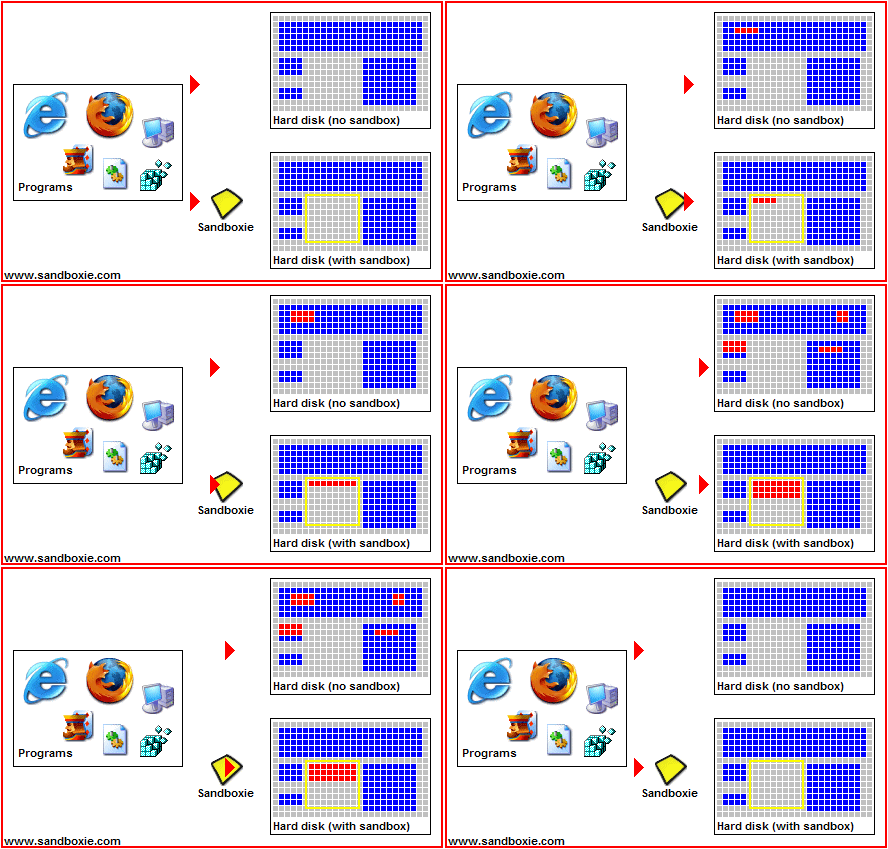
The illustration shows how changes made by a program running normally flow directly into the system, while changes made by a sandboxed program are redirected into a controlled container. All sandboxed changes are grouped together and can be deleted instantly, restoring the system to its prior state.
Key Benefits
Secure Web Browsing
Web browsers running under Sandboxie are isolated from the host system. Any malware or unwanted software downloaded during browsing is confined to the sandbox and can be removed simply by deleting its contents.
Enhanced Privacy
Browsing history, cookies, cached files, and other temporary data remain inside the sandbox and do not persist in the host operating system unless explicitly recovered by the user.
Secure Email Handling
Attachments and content originating from email clients can be opened safely. Malicious payloads are prevented from modifying the real system or spreading beyond the sandbox.
System Integrity
Software can be installed, tested, and executed without permanently altering Windows. This reduces system degradation over time and simplifies cleanup and rollback.
Editions: Plus and Classic
Sandboxie is available in two editions: Plus and Classic.
Both editions share the same core architecture, including the service and kernel driver, and therefore provide the same level of isolation, security, and compatibility. The difference lies in the user interface and feature availability.
Sandboxie Plus introduces a modern Qt-based interface and provides access to all features added since the project was open-sourced.
Sandboxie Plus Features
Usability and Management
- Modern Qt-based user interface
- Snapshot Manager for restoring sandboxes to known states
- Maintenance menu for managing drivers and services
- Portable mode (no system installation required)
- Integrated troubleshooting and browser compatibility wizards
- Searchable sandbox list and configuration settings
- Import and export of sandboxes using 7z archives
- Windows Start Menu integration
- Vintage View mode for classic UI appearance
Security and Isolation Enhancements
- Privacy-mode sandboxes to protect user data from unauthorized access
- Security-hardened sandboxes with restricted system calls and endpoints
- Per-sandbox firewall based on Windows Filtering Platform (WFP)
- DNS control (block or redirect)
- Encrypted sandboxes using AES-based storage
- Protection against host interaction (e.g., screenshot prevention)
- Independent token creation model for stronger sandbox separation
- Custom UAC dialog handling (deny, fake, or allow elevation attempts)
Control and Automation
- Force programs or child processes into sandboxes
- Per-sandbox memory limits and process count limits
- Global hotkeys to suspend or terminate sandboxed processes
- Trigger system for sandbox lifecycle events
- Optional SOCKS5 proxy enforcement per sandbox
Customization
- Advanced Start/Run and Internet access restrictions
- Internal INI editor with contextual hints and tooltips
- Support for external text editors
- Custom sandbox colors, icons, fonts, and UI transparency
Summary
Sandboxie provides a robust, transparent isolation layer for Windows applications. It enables safe execution of untrusted or high-risk software without relying on virtualization or cloud services, while remaining lightweight and fully local to the system.
By isolating applications rather than the entire operating system, Sandboxie offers a practical and effective approach to endpoint security, privacy protection, and system stability.