Force Protection On Mount
ForceProtectionOnMount is a SandMan-consumed per-box setting in Sandboxie Ini, introduced in Sandboxie Plus 1.13.4 / Classic 5.68.4. It constrains SandMan's image-mount dialog/workflow to request mounted-root protection for a file-backed sandbox image.
It is not a service-wide rule enforced for every mount caller.
Usage
[DefaultBox]

ForceProtectionOnMount=y
SandMan reads the direct box value, with a fallback of n. Do not assume that a template or GlobalSettings value controls this workflow.
When to use
Use this setting when you want SandMan to request mounted-root protection without allowing it to be unchecked in the mount dialog. Protection while mounted is separate from image encryption and is not an absolute host-access guarantee.
Behavior and UI
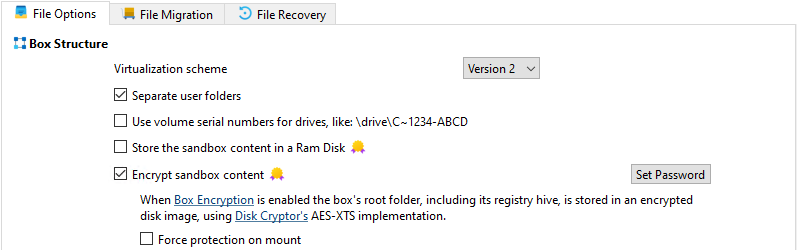
Enable Force protection on mount under Sandbox Options > General Options > File Options. The checkbox is available when the image-backing option is enabled and selected, not for the normal RAM-disk choice.
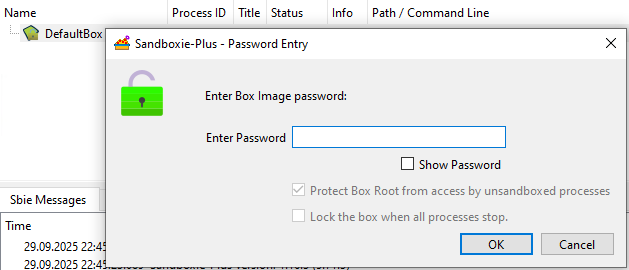
For the resulting SandMan mount dialog, the setting checks and disables Protect Box Root from access by unsandboxed processes. The mount request reaches the service and driver to request protection.
[!WARNING]
Requesting protection does not prove successful registration. A mount can succeed even if root-protection registration fails, and the normal mount query does not establish that protection is active.
See Encrypted Sandboxes for the mounted-access boundary and Protect Admin Only for the session-leader exception.
Automatic unmount limitation
Do not rely on this setting to force automatic unmount for every SandMan mount. Current caller initialization can overwrite the auto-lock state after the dialog's force state is applied.
SandMan's startup-mount path supplies automatic unmount enabled. The normal manual-mount path supplies it disabled, which can leave Lock the box when all processes stop. disabled and unchecked, as shown above. This is a current implementation discrepancy, not a guarantee that automatic unmount is forced.
Automatic unmount itself depends on successful Registry/root release and device cleanup. See Use File Image for that lifecycle.
Other callers and unmounting
Start.exe /mount does not consume ForceProtectionOnMount. /mount_protected requests root protection explicitly; see Start Command Line.
The setting does not control process termination or unmount success. SandMan's manual unmount action and the underlying service unmount operation have separate behavior, described in Use File Image.